


Website Redesign in Springfield, MO: How to Switch Without Losing Your Google Rankings
- A redesign only costs you rankings when URLs change without redirects, pages get deleted, or a staging noindex tag goes live. New colors and layouts do not move rankings on their own.
- The safe order is: inventory every URL that gets impressions, map each old URL to one new URL, launch with 301 redirects live, then validate in Search Console for several weeks.
- Redesigns at Thomas McKee start at $2,497 and include the URL inventory, redirect map and post-launch Search Console check. Ask about yours or call (417) 812-6313.
A website redesign in Springfield, MO should earn you more calls, not cost you the Google rankings you spent years building. Most owners I talk to want both and fear they can only have one. That fear is reasonable. I have inherited sites from other developers where a pretty new design erased a decade of search visibility in a weekend, and the owner did not know why the phone stopped ringing. This article is the plan I follow so that does not happen: what a redesign changes, what Google actually cares about, the exact order of work, and what each option costs.
What does a website redesign in Springfield, MO actually change?
A redesign replaces the look, the layout and often the page structure of your site while your domain, your business and most of your content stay the same. The risk to rankings lives entirely in the structural part: changed URLs, deleted pages and missing redirects, never in the colors or fonts.
Here is why I wrote this. Our own Search Console data shows the thomasmckee.com homepage appeared 253 times in 90 days for the search "website redesign springfield mo" at an average position of 4.3 and earned 0 clicks. Owners in Springfield are searching for this, landing on agency homepages, and finding nothing that answers the question. The web design springfield mo page covers every build tier and what is included; this article covers the one question that page cannot answer in a paragraph: how to switch without losing what you already have.
Two kinds of businesses ask me about a redesign. The first has a site that looks dated but ranks fine. The second has a site that neither looks good nor ranks. The plan below protects the first group and helps the second group start from a clean inventory instead of guesswork.
Will a website redesign hurt my Google rankings?
No, not if every URL that ranks today either keeps its address or sends a permanent redirect to one equivalent new page. Google's own site move documentation states that 301 redirects do not cause a loss in PageRank, so a redirect done right carries the ranking signal across.
It will hurt when pages disappear. Ahrefs documented a site that deleted about 15% of its organic pages during a redesign and lost almost 50% of its organic traffic, and growth in links afterward did not bring the traffic back. The pages that were cut had rankings and backlinks the new site never inherited.
It also hurts when redirects are lazy. Google warns against sending many old URLs to one unrelated page such as the homepage, because it can be treated as a soft 404, which is the same as the page not existing. And it hurts when the staging site's noindex tag ships with the launch. That mistake can sit unnoticed for weeks while leads drop. Every one of those failures is a checklist item, not bad luck.
How do you redesign a website without losing SEO?
You inventory every URL that gets impressions or links, map each one to its new address, launch with the redirects already live, and then watch Search Console until the new URLs are the ones showing. That is the order I followed on the October 2026 rebuild of thomasmckee.com, and it is the order I use on every client redesign.
- Build the URL inventory. Export the Pages report from Search Console for the longest date range it offers, then add every URL from your XML sitemap and your WordPress page list. Google's guidance says to include images, PDFs and other embedded files in the move, so list those too. Mark each row with its impressions, clicks and whether other sites link to it.
- Decide the fate of every row. Keep, merge or retire. A page with impressions or links is kept or merged, never retired. If you retire a page, it should return a real 404, not a redirect to something unrelated.
- Write the redirect map. One old URL to one new URL, one hop. Google advises redirecting straight to the final destination and keeping any chain to no more than 3 hops. The map is a spreadsheet, and you should have a copy of it before launch day.
- Build on staging and carry the SEO over. The new site is built on a private copy with a noindex tag. Titles, meta descriptions, H1s, image alt text, LocalBusiness schema and internal links are copied across page by page, not left for the theme to rewrite.
- Launch in one pass. Remove the noindex, turn on the redirects, test them, then submit the new sitemap in Search Console. Google recommends that small and medium sites move all URLs at once rather than in pieces.
- Validate for weeks, not days. Check the Pages report for new 404s, compare your top queries to the pre-launch export, and leave the redirects in place. Google's rule is to keep them for at least 1 year.
Notice there is no "pick a theme" step before step 4. Design decisions wait until the inventory exists, because the inventory decides which pages the design has to hold.
Should I keep my old URLs when I redesign?
Yes. Keep every URL that ranks, gets traffic or has links pointing to it unless there is a business reason to change it. A URL that already ranks is an asset; a changed URL is a page Google has to evaluate as if it were new, even with a perfect redirect.
Google's site move guide puts it plainly: change only one thing at a time. If you want a new design and a new URL structure and a new domain, do them as separate projects, not one launch. For most Springfield businesses, the design can change completely while the addresses stay exactly where they were.
The exception is a site that never had the pages customers actually search for. A concrete contractor with one "Services" page is losing searches for driveways, patios and foundations in Springfield, Nixa and Ozark. That redesign should add those pages, with "Springfield" in the title where it matters, and the old Services URL should redirect to the one new page that best matches its old content. Adding pages is safe. Deleting pages is what costs you.
What should change in a redesign, and what should stay the same?
Change whatever stops a customer from calling: slow load on a phone, a phone number that is not on the first screen, services buried three clicks deep, and forms that go nowhere. Keep whatever Google already rewards: the URLs that rank, the titles that earn clicks, and the content on pages with traffic.
A redesign is a lead-generation tool, not an online brochure, so I judge every change by whether it makes the next step clearer. Here is how that looked on a full redesign for a Springfield auto repair shop:
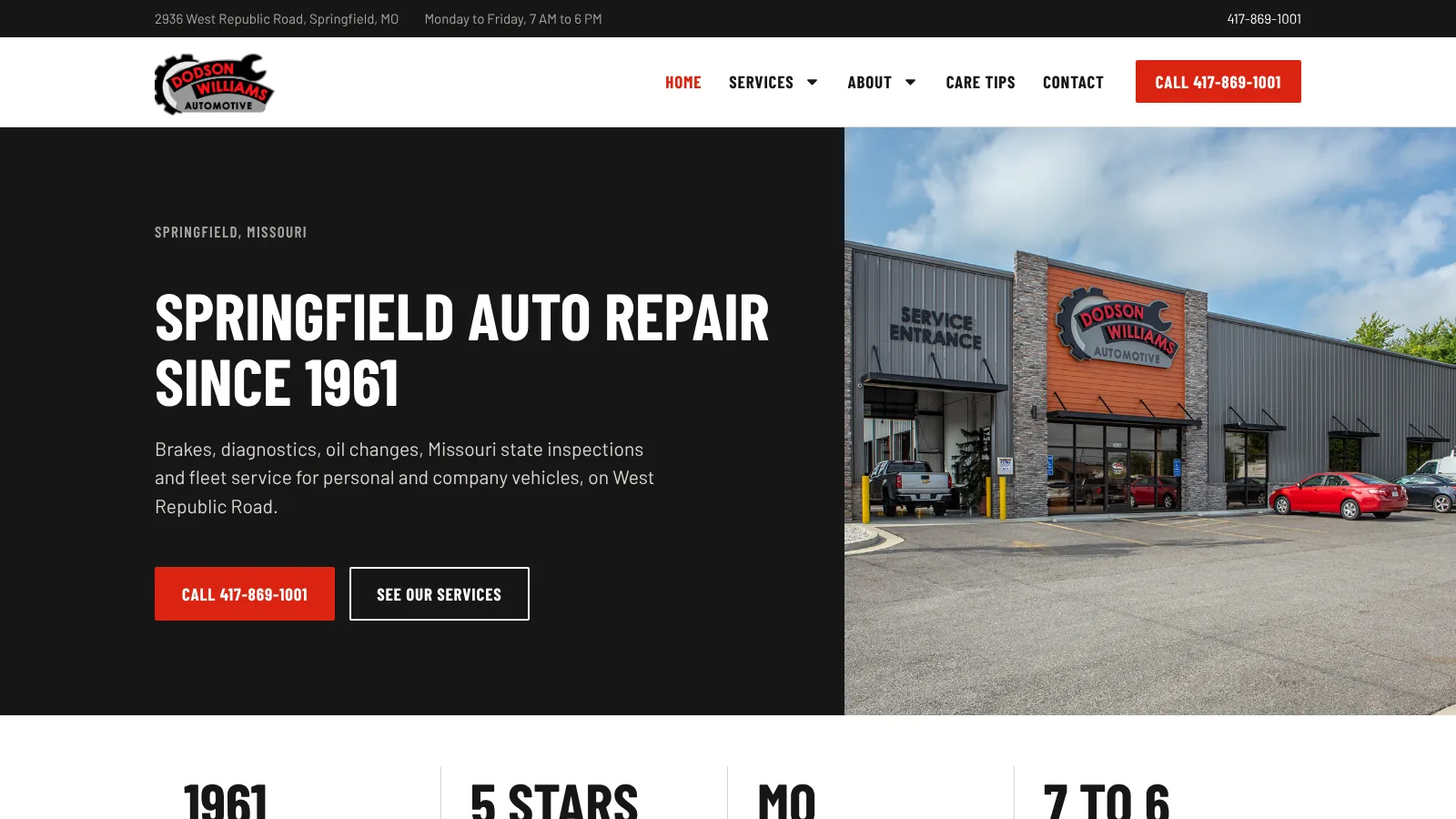
"When someone searches for an automotive repair business, trust is the major consideration. For Dodson Williams I focused on service clarity, straightforward navigation, and making contact and appointment opportunities easy to find. Visitors shouldn't have to figure out how a website works. The navigation should feel natural, the important information should be obvious, and the next step should always be clear."Thomas McKee
Nothing in that list required changing a ranking URL. Clarity, navigation and a visible next step are design jobs. Rankings are an inventory job. Keep the two separate and you can be aggressive with the first without gambling the second.
Which redesign option fits a Springfield business?
Most Springfield businesses need one of 4 kinds of redesign, and the ranking risk differs far more than the price does. The table shows who each fits, the starting price on my published price list, and what Google says to expect on the search side.
| Redesign option | Who it fits | Starting price | Redirects needed | What Google says to expect |
|---|---|---|---|---|
| New design, same URLs, same WordPress site | A business whose pages already rank and only the look and mobile experience are dated | $2,497 (Starter, 1 to 5 pages) or $3,497 (Semi-custom) | None, because no address changes | No site move at all; rankings change only if content changes |
| New design with reorganized pages and new URLs | A business with one catch-all services page that needs a page per service and town | $5,997 (Custom) | One 301 per old URL, kept at least 1 year | A few weeks for most pages to move on a small to medium site, with temporary ranking fluctuation |
| Online store rebuilt on WooCommerce | A retailer moving products off a builder or an old cart | $3,997 (E-commerce) | One 301 per product and category URL | Move all URLs at once; submit the new sitemap on launch day |
| Redesign plus a new domain name | A rebrand or two merged companies | $5,997 (Custom) and up, depending on page count | Every old URL to its new-domain twin, plus a Change of Address in Search Console | Expect fluctuation while every URL is recrawled; redirects stay at least 1 year |
| Care after launch | Any owner who wants redirects, backups, updates and 404s watched monthly | $277 per month (Maintenance) | Not applicable | Not applicable |
Prices from Thomas McKee's published price list; redirect and timing guidance from Google Search Central's site move documentation, both checked November 2026.
The first row is the one most owners need and the one most agencies oversell. If your URLs are fine, say so, and spend the budget on the pages and the phone-first layout instead. Full tier details are on the website design pricing section, and a breakdown of what a website costs in Springfield covers the three-year math.
How long does a website redesign take, and when do rankings settle?
The build clock is in your hands: content, photos and approvals decide it, and a site with ready content and one decision-maker launches far sooner than one waiting on copy. The Google clock is separate. Its documentation says that for a small to medium site it can take a few weeks for most pages to move, and that temporary ranking fluctuation during that window is normal.
What you should see in Search Console during those weeks: impressions shifting from old URLs to new ones, the old-URL sitemap draining toward zero indexed pages, and no spike in "Not found" errors. If a spike appears, it is almost always a redirect pointing at a URL that does not exist on the new site. That is a 10-minute fix when someone is watching and a 3-month problem when nobody is.
Timing helps too. Google suggests launching during your slow season or your lowest-traffic weekday. For a Springfield HVAC company that means not the first 90-degree week of June; for a tax preparer, not March.
Planning a redesign? Protect what already ranks.
Every redesign here includes the URL inventory, the redirect map and the post-launch Search Console check. Built, hosted and ranked from Springfield since 1996. 600+ projects, Best SEO in Springfield 2020 to 2025.
FAQ
How much does a website redesign cost in Springfield, MO?
Redesigns at Thomas McKee start at $2,497 for a Starter site of 1 to 5 pages, $3,497 for Semi-custom, $5,997 for Custom and $3,997 for an online store. Every price is fixed before work starts and includes the URL inventory, the redirect map and the post-launch Search Console check.
How long after a redesign do Google rankings recover?
If every ranking URL kept its address, there is nothing to recover. If URLs changed and were redirected, Google says a small to medium site takes a few weeks for most pages to move, with temporary fluctuation in between. Rankings that have not settled after that window usually point to a broken redirect or a page that was deleted.
Do I need to tell Google that I redesigned my website?
You submit the new XML sitemap in Search Console on launch day, and that is enough for a redesign on the same domain. The Change of Address tool is only for moving to a different domain or subdomain. Google finds everything else by following your redirects.
Can I redesign my website myself without losing rankings?
You can if you keep every ranking URL, carry over every title and heading, and never let a staging noindex tag go live. The usual failure is switching to a new theme that rewrites titles and headings behind the scenes. If you are unsure, a free website and SEO audit before you start will show you which pages you cannot afford to lose.
- Rankings are lost through changed URLs, deleted pages and leftover noindex tags, not through new design.
- Inventory first, redirect map second, design third. The inventory tells the design which pages it must hold.
- Keep every URL that ranks or has links. When one must change, redirect it one hop to one equivalent page and keep that redirect at least 1 year.
- A redesign that keeps its URLs starts at $2,497 and carries almost no ranking risk; reorganizing pages or changing domains is where the Search Console work matters.
- Change only one thing at a time: design now, URL structure or domain as a separate project.

Owner, Thomas McKee Website Design & SEO Solutions. Springfield, MO web design and SEO for local businesses, voted Best SEO in Springfield six years running (2020-2025). 600+ websites built since 1996, hosted on our own servers, with Thomas McKee personally on every project. What we do